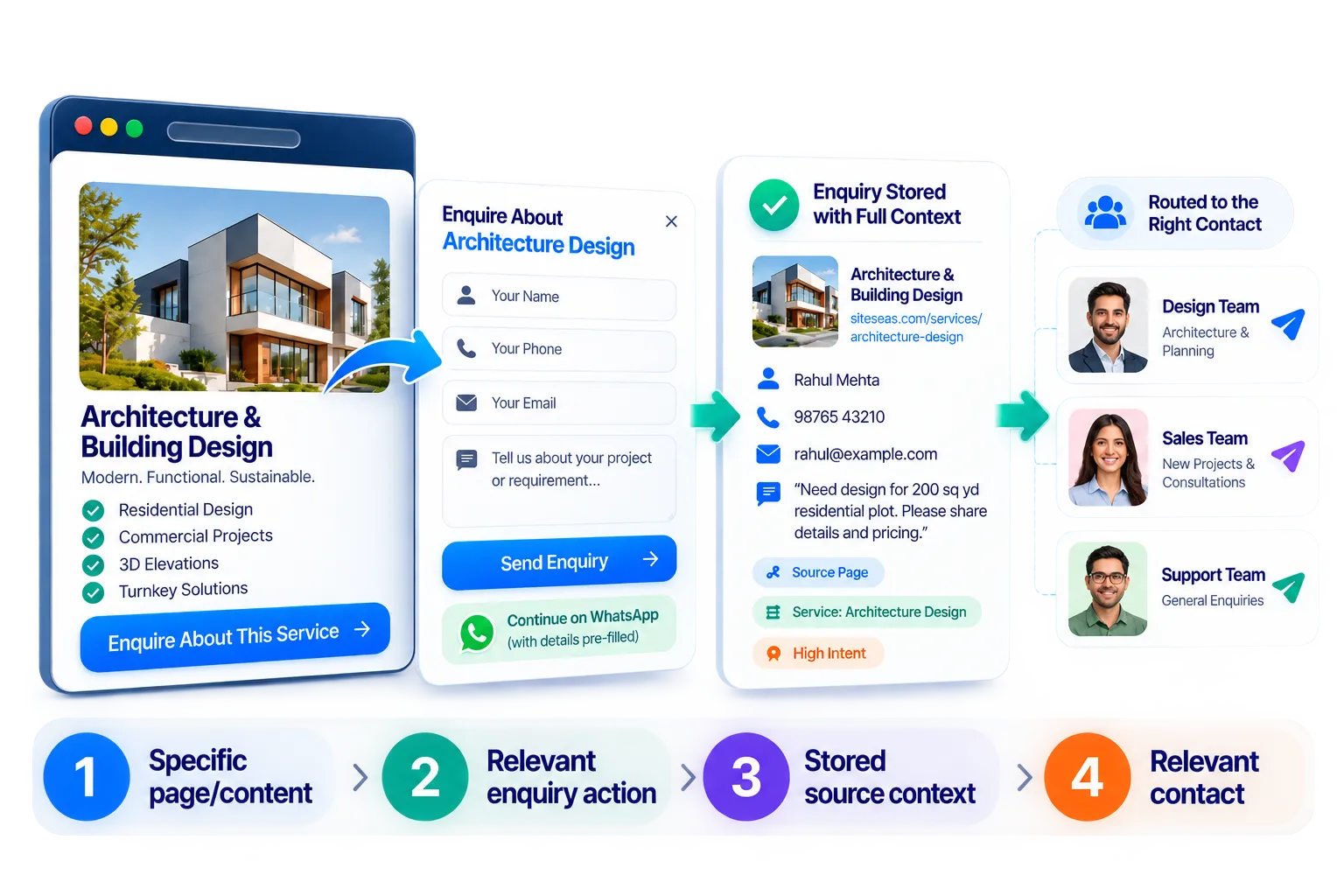
A good business website should do more than collect a name and phone number. It should help your team understand what the visitor was interested in when the enquiry began.
The SiteSeas Smart Enquiry System is built into the SiteSeas managed business website platform. Visitors can submit a website enquiry form from the page, product, service, course, package or rich content that caught their attention, while useful source context stays connected to the captured lead.
For the visitor, the experience stays familiar: explore, choose the right enquiry action and send the details. For the business, the first conversation can start with better context instead of another "Which product?" or "Which service?" question.
A visitor may explore a specific product, service, course or package, then reach one general Contact Us form. The business receives a name, phone number and short message - but may still need to ask what the visitor was actually viewing.
With SiteSeas, relevant website content can become a contextual website enquiry point. The captured lead can keep the available page, component or individual item context, giving the business a clearer starting point for the response.
A basic contact-only website can put your business online, but it may leave valuable visitor interest unexplained. When people explore specific products or services before contacting you, SiteSeas helps carry that interest into the enquiry so your team can start the conversation with better context.
The difference is not "more forms". The aim is to make the first business conversation more informed.
Imagine a modular-kitchen website showing L-Shaped Kitchen, U-Shaped Kitchen, Island Kitchen and Premium Kitchen as ready-to-use tiles. A visitor opens Island Kitchen and sees two purposeful actions: Ask About This and Request Quote.
If the visitor chooses Request Quote, the form can ask for the contact and requirement information useful for that action. SiteSeas keeps the Island Kitchen context with the website enquiry. The lead can remain available for review and, where configured, WhatsApp can open with a readable message for the relevant contact.
The business does not need to begin with "Which kitchen were you viewing?" The first response can start closer to the actual requirement. The same principle works for products, services, courses, treatments, properties, packages and other meaningful website items.
SiteSeas can keep the enquiry action close to the content a visitor is already exploring. Useful source context can come from three levels:
A service page, course page, category page, branch page or other meaningful page can present the enquiry action that fits that page. Best when the page itself represents the visitor's need.
Ready-to-use components such as tiles, carousels/rotators, tabs, accordions, image galleries and video sections can keep the enquiry action close to the information being explored. Best when one page presents several offerings or content groups.
A specific product, service, course, treatment, package or other structured item can carry its own context into the enquiry. Best when the business needs to know exactly which item created the interest.
That continuity is the core website lead capture advantage: the visitor does not need to remember a product name, copy a page URL or explain the interest again from scratch.
Not every visitor is ready for the same next step. One person may only need an answer; another may already be ready to request a quotation, consultation, appointment or admission discussion.

Use the easier first action when the visitor mainly wants to ask about the content. Labels can include Ask About This, Product Enquiry, Service Enquiry or Course Enquiry. The configured website enquiry form uses the selected supported fields that make sense for that action.

Use the stronger action where the visitor has a more specific requirement. Labels can include Request Quote, Request Bulk Quote, Request Consultation, Request Appointment or Admission Enquiry. The Secondary path can use a different selected field set when the stronger request needs more information.
Depending on configuration, supported fields can include Name, Email, Phone, Quantity, Message, Notes, Appointment Date and Till Date. A lead capture form should ask only for what helps the next conversation. For example, a request a quote form may need quantity; a simple question may not. General CTA, Contact and Footer forms can continue to handle broader enquiries.
SiteSeas connects the website enquiry record with an optional WhatsApp continuation. Forms use supported fields, with configurable enquiry labels, required fields, destination contacts and WhatsApp message settings.

WhatsApp is already where many business conversations happen. SiteSeas makes the website and WhatsApp work together instead of treating them as two disconnected starting points.
The visitor submits the website enquiry first. SiteSeas stores the lead with the available source and form context. WhatsApp can then open with a readable pre-filled message for the relevant configured contact.
That is different from a basic WhatsApp button that may open a chat with only "Hi" or "Price?". With SiteSeas, the WhatsApp conversation can begin with the enquiry details and available website context already prepared.
The visitor still decides whether to send the WhatsApp message. The website enquiry has already been captured before that step, so the lead remains available in SiteSeas for review even if the WhatsApp chat is not completed.
The visitor should see a simple website enquiry experience. The useful handling logic can stay behind the scenes.

SiteSeas supports website lead routing through configured page and form contacts. Where applicable, enquiries can move towards the saved contact or department relevant to that website area instead of requiring the owner to manually forward everything.

If a more specific destination is not available, fallback handling helps reduce lost enquiries. Where Lead Managers are used, access can also be scoped by assignment and permissions so permitted users focus on the enquiries relevant to them.

Practical contact form spam protection combines layered spam checks, duplicate protection and review controls to reduce unwanted submissions. Suspicious enquiries remain reviewable, and permitted users can restore a genuine enquiry when appropriate.
The goal is not to promise zero spam or turn SiteSeas into a full CRM. The goal is a cleaner, more relevant website-enquiry workflow before normal sales follow-up continues.
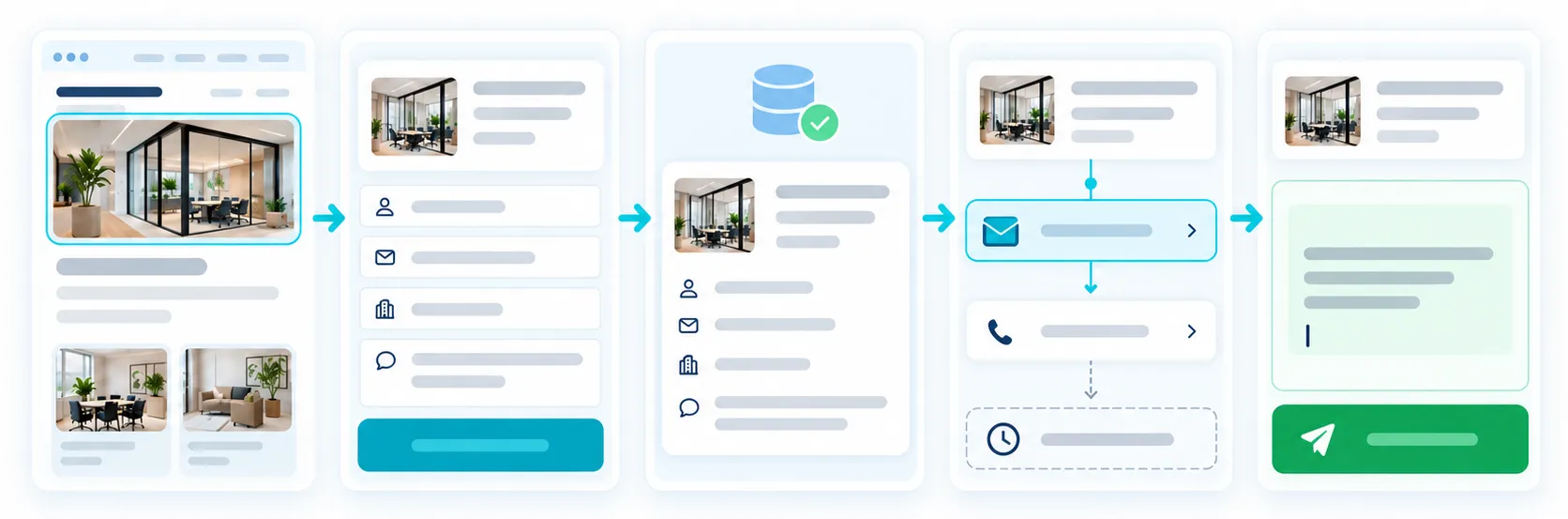
From Visitor Interest to a Clearer Website Enquiry
The visitor explores a relevant page, product, service or rich content item.
The visitor chooses the enquiry action that matches the need.
The website enquiry form captures the selected details while SiteSeas keeps the available source context.
SiteSeas stores the website lead before any WhatsApp handoff.
The enquiry can continue to WhatsApp or move towards the relevant configured contact.
Spam/review controls help keep suspicious submissions separate without hiding them from permitted review.
The visitor does not need to understand routing rules, source validation, spam scores or internal permissions. The sophistication stays underneath. What the visitor sees is a professional website that makes it easy to ask about the right thing.
Different businesses use different labels and fields. The common principle stays the same: keep the enquiry connected to the interest that created it.

Once an enquiry is captured, your team can review it with its available source context in Lead Dashboard & Intelligence. Explore that page to see how SiteSeas helps you review enquiries and understand recurring interest in your website content.
The Smart Enquiry System is the enquiry-capture feature of the SiteSeas managed business website platform. It lets visitors enquire from relevant website content, keeps available source context with the lead, and supports configured forms, WhatsApp continuation, contact routing and spam review.
A normal contact form usually captures contact details and a message. A contextual website enquiry can also keep the relevant page, rich component or individual item context connected to the lead, so the business starts with a clearer idea of what the visitor was asking about.
Yes. Relevant content can use the configured Primary and/or Secondary enquiry path, allowing actions such as Product Enquiry, Service Enquiry, Ask About This, Request Quote, Request Consultation or Admission Enquiry where appropriate.
Yes. Primary and Secondary enquiry paths can use different labels and selected supported fields, so a visitor can have an easy first-question path and a stronger quote, consultation, appointment or admission path where useful.
Depending on configuration, supported fields can include Name, Email, Phone, Quantity, Message, Notes, Appointment Date and Till Date. The form should use only the fields that help the next response.
Yes. SiteSeas stores the website lead first with the available context. WhatsApp can then open with a readable pre-filled message, while the visitor decides whether to send the chat.
Yes. Applicable page and form settings can use configured contacts or departments, with fallback handling where relevant. Lead Manager access can also be scoped by assignment and permissions.
SiteSeas uses layered spam checks, duplicate protection and review controls to reduce unwanted website enquiries. Suspicious submissions remain available for permitted review, so genuine enquiries can be restored when appropriate. No spam filter can block every unwanted submission.
No spam filter is perfect. SiteSeas is designed to reduce enquiry noise and make suspicious submissions easier to review, while allowing permitted users to restore a genuine enquiry when appropriate.
No. It focuses on the website enquiry layer: capture, context, WhatsApp continuity, routing and review. A business can continue its normal follow-up or CRM process after the website enquiry is captured.
Give visitors a simple way to ask about the right product, service or requirement - while your team receives a clearer starting point for the response.